[AI] n8n과 Private LLM, Slack, Jira 연동해보기 (+Proxy)
스포
몇년 전까지만 해도, Uipath사의 RPA가 업무 자동화의 혁명이었던거같은데,
현재는 n8n이 대세인 것 같다. 아직 유튜브에 외국 영상만 조회되는 Langchain 추론 개념까지 더해진다면 무서울 따름이다.
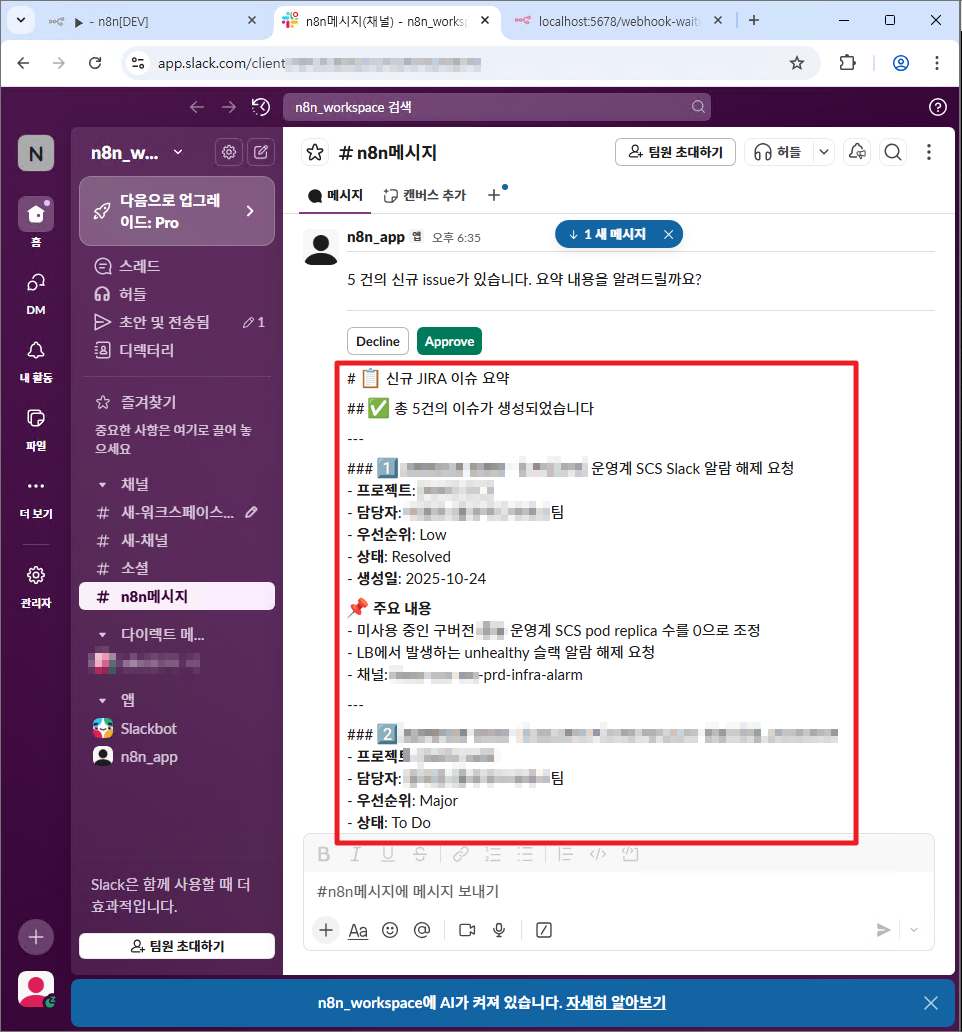
아래는 n8n을 활용해서, Confluence의 내용을 읽고, LLM으로 분석하고, Slack 알림 전송한 화면이다.
시작하기 - n8n 및 프록시서버 설치
우선 간략하게, n8n과 proxy를 설치해야 한다.
n8n을 실행하기 위해서는 docker가 가장 좋겠지만, 보안 이슈로 npm으로 설치했다.
proxy의 경우도 마찬가지다.
설치 가이드 https://gdpark.tistory.com/407#section3-2
반복 업무 끝! n8n으로 똑똑하게 자동화하는 방법 (컴퓨터 사양 & 설치 가이드)
n8n으로 자동화의 신세계 경험하기! 🌐 복잡한 반복 업무에 지치셨나요? n8n이 왜 당신에게 필요한지, 어떤 사양이 필요한지, 어떻게 설치하는지 쉽고 친절하게 알려드릴게요!혹시 저처럼 반복되
gdpark.tistory.com
Private LLM 연동 위한 프록시 서버(python) 설정 => 0.0.0.0/8001
proxy.py
from fastapi import FastAPI, Request, Response
from fastapi.responses import JSONResponse
import httpx
import json
import logging
import time
from fastapi.responses import RedirectResponse

app = FastAPI(title="N8N Claude Proxy")

# --- 로깅 설정 ---
logging.basicConfig(level=logging.INFO)
logger = logging.getLogger("n8n_claude_proxy")

# Claude API URL
CLAUDE_API_URL = "https://{{Privat LLM Url}}/v2/api/claude/messages"

# === 요청/응답 상세 로깅 미들웨어 ===

@app.middleware("http")
async def redirect_http_to_https(request: Request, call_next):
    proto = request.headers.get("x-forwarded-proto", request.url.scheme)
    if proto == "http":
        url = request.url.replace(scheme="https")
        return RedirectResponse(str(url))
    return await call_next(request)

@app.middleware("http")
async def logging_middleware(request: Request, call_next):
    started = time.time()

    # 원시 바디 읽기 (최대 2KB 프리뷰)
    body_bytes = b""
    try:
        body_bytes = await request.body()
    except Exception as e:
        logger.warning(f"[REQ] body read error: {e}")

    preview = body_bytes[:2048]
    truncated = len(body_bytes) > 2048

    hdr = request.headers
    log_headers = {
        "host": hdr.get("host"),
        "content-type": hdr.get("content-type"),
        "content-length": hdr.get("content-length"),
        "authorization_present": ("authorization" in hdr),
        "x-api-key_present": ("x-api-key" in hdr),
        "x-forwarded-proto": hdr.get("x-forwarded-proto"),
        "x-forwarded-for": hdr.get("x-forwarded-for"),
        "user-agent": hdr.get("user-agent"),
    }

    logger.info(
        f"[REQ] {request.method} {request.url} "
        f"client={request.client.host if request.client else '-'} "
        f"headers={log_headers} "
        f"body_preview={preview!r}{' (truncated)' if truncated else ''}"
    )

    # 처리
    try:
        response = await call_next(request)
    except Exception as e:
        elapsed = int((time.time() - started) * 1000)
        logger.exception(f"[ERR] {request.method} {request.url.path} elapsed={elapsed}ms error={e}")
        return JSONResponse(status_code=500, content={"error": "internal_error", "detail": str(e)})

    elapsed = int((time.time() - started) * 1000)
    logger.info(
        f"[RESP] {request.method} {request.url.path} status={response.status_code} elapsed={elapsed}ms"
    )
    return response


def prepare_claude_request(data: dict) -> dict:
    """n8n 요청을 Claude API 형식에 맞게 변환"""
    if 'model' in data:
        model = data['model'].lower()
        if 'opus' in model:
            data['model'] = 'claude-opus-4'
        else:
            data['model'] = 'claude-sonnet-4'
    else:
        data['model'] = 'claude-sonnet-4'

    data['model'] = 'claude-sonnet-4-5'
    data['stream'] = False  # n8n에서는 스트리밍 불필요
    if 'max_tokens' not in data or data['max_tokens'] < 10:
        data['max_tokens'] = 100

    return data


@app.get("/")
async def root():
    """루트 라우트"""
    return {
        "service": "N8N Claude Proxy",
        "status": "running",
        "available_endpoints": ["/health", "POST /v1/messages"]
    }


@app.get("/v1/models")
async def list_models():
    return JSONResponse(
        content={
            "object": "list",
            "data": [
                {"id": "claude-3-haiku-20240307", "object": "model"},
                {"id": "claude-opus-4", "object": "model"},
                {"id": "claude-sonnet-4", "object": "model"},
                {"id": "claude-sonnet-4-5", "object": "model"}
            ]
        },
        status_code=200
)


@app.post("/v1/messages")
async def n8n_to_claude(request: Request):
    """n8n -> Claude API 간단 프록시"""
    try:
        # JSON 파싱 (실패 시 원문 로깅)
        try:
            data = await request.json()
        except json.JSONDecodeError:
            raw = await request.body()
            logger.error(f"[JSONError] invalid JSON body: {raw!r}")
            return JSONResponse(status_code=400, content={"error": "invalid_json", "detail": "Request body must be valid JSON."})

        logger.info(f"[BUS] n8n request model={data.get('model', 'unknown')}")

        claude_data = prepare_claude_request(data)

        # 헤더 준비 (API 키 변환)
        headers = {}
        # api_key = request.headers.get('x-api-key') or request.headers.get('Authorization')
        api_key = {{Private LLM ApI Authorization Key}}
        if api_key:
            headers['Authorization'] = api_key

        # async with httpx.AsyncClient(timeout=httpx.Timeout(30.0)) as client:
        async with httpx.AsyncClient(timeout=httpx.Timeout(30.0), verify=False) as client:
            upstream_resp = await client.post(
                CLAUDE_API_URL,
                json=claude_data,
                headers=headers
            )

        logger.info(f"[UPSTREAM] status={upstream_resp.status_code} content-type={upstream_resp.headers.get('content-type')}")

        return Response(
            content=upstream_resp.content,
            status_code=upstream_resp.status_code,
            headers={"content-type": upstream_resp.headers.get("content-type", "application/json")}
        )

    except httpx.HTTPError as e:
        logger.exception(f"[HTTPError] {e}")
        return JSONResponse(status_code=502, content={"error": "upstream_http_error", "detail": str(e)})
    except Exception as e:
        logger.exception(f"[UnhandledError] {e}")
        return JSONResponse(status_code=500, content={"error": "internal_error", "detail": str(e)})

@app.get("/health")
async def health():
    return {"status": "ok"}

if __name__ == "__main__":
    import uvicorn
    # uvicorn.run(app, host="0.0.0.0", port=8001)

    # uvicorn.run(app, host="localhost", port=8001)

    # openssl req -x509 -newkey rsa:4096 -nodes -out cert.pem -keyout key.pem -days 365
    # uvicorn n8n_claude_proxy:app --host localhost --port 8001 --ssl-keyfile=key.pem --ssl-certfile=cert.pem
    uvicorn.run("n8n_claude_proxy:app", host='0.0.0.0', port=8001, ssl_keyfile='key.pem', ssl_certfile='cert.pem')
Invalid HTTP request received. 이슈 조치
FastAPI의 비동기 웹 서버인 uvicorn에서, http 요청이 강제로 https로 전환되버려서,
아래와 같이 로그가 발생했고, openssl 설정 적용해주었다.

참고링크1 https://stickode.tistory.com/1534
[Python] FastAPI 에서 HTTPS 설정하기
안녕하세요.오늘은 FastAP에서 HTTPS 설정을 해보겠습니다. 1. HTTPSHTTPS(HyperText Transfer Protocol Secure)는 HTTP 프로토콜에 SSL/TLS 암호화 계층을 추가한 보안 통신 프로토콜입니다.즉, 웹 브라우저와 서버
stickode.tistory.com
참고링크2 https://bonory.tistory.com/96
[Safari] http 요청을 https로 강제 전환해버리는 문제 | fastapi, uvicorn
기존에 진행되어서 배포된 프로젝트에서 safari로 접속시 버그가 있다는 제보에 local에서 실행시키고 localhost로 접속을 시도했다. WARNING: Invalid HTTP request received. Traceback (most recent call last): File "/User
bonory.tistory.com
프록시 웹 서버(python) 실행
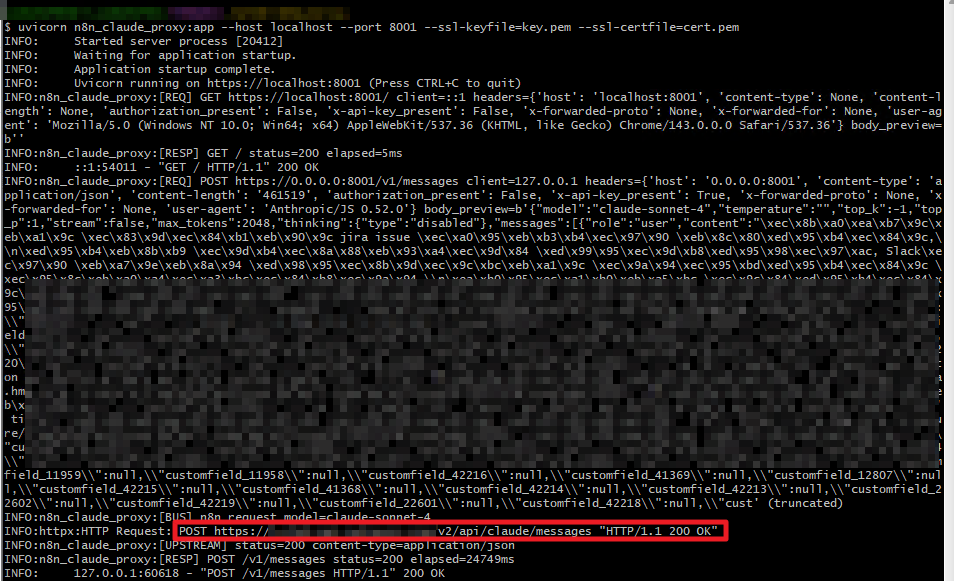
이번엔 정상적으로 띄우기 성공~ (200 OK 확인)
# gitbash로 프록시 서버 실행
cd /d/n8n-demo/proxy
python -m venv venv
venv/Scripts/activate
# python n8n_claude_proxy.py
uvicorn n8n_claude_proxy:app --host localhost --port 8001 --ssl-keyfile=key.pem --ssl-certfile=cert.pem
n8n 실행 위한 env 사전 설정 (프록시 추가 필수)
# 로그 파일 저장 경로 (선택사항, 기본값: ./logs)
LOG_DIR=./logs
LOG_LEVEL=INFO

# ---------- Postgres ----------
DB_TYPE=postgresdb
DB_POSTGRESDB_HOST=localhost
DB_POSTGRESDB_PORT=5432
DB_POSTGRESDB_DATABASE=n8n_pg
DB_POSTGRESDB_USER=postgres
DB_POSTGRESDB_PASSWORD=postgres

# ---------- n8n ----------
N8N_BASIC_AUTH_ACTIVE=true
N8N_BASIC_AUTH_USER=demo
N8N_BASIC_AUTH_PASSWORD=demo123

# n8n 포트 (로컬에서 열 포트)
N8N_PORT=5678

# (테스트용/임시) TLS 검증 비활성화 - 운영 비권장
NODE_TLS_REJECT_UNAUTHORIZED=0
# 운영 권장: 사설 CA PEM 파일을 Node에 추가
# NODE_EXTRA_CA_CERTS=C:\certs\corp-root.pem

# (선택) 프록시가 필요한 환경이라면 설정
# HTTP_PROXY=http://<proxy-host>:<port>
HTTP_PROXY=http://0.0.0.0:8001
n8n 실행하여 웹 에디터 띄우기 => localhost:5678
# gitbash로 n8n 실행
cd /d/n8n-demo
n8n start
n8n 워크플로우 구성
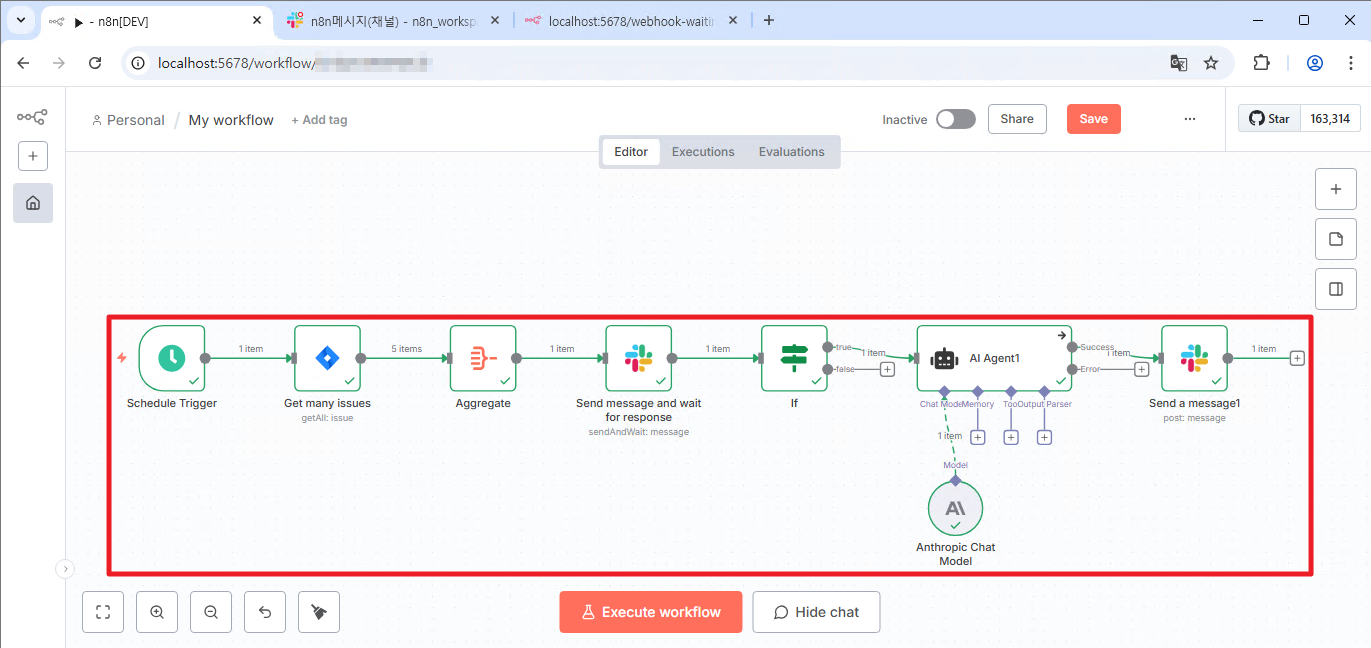
트리거 -> Confluence issue 수집 -> Aggregate 전처리 -> Slack 알람 발생 -> if조건문 -> AI agent ( 프록시 서버는 업스트림으로 Private LLM API를 호출 연동) -> Slack 결과 전송
Jira 인증정보 설정

Jira 연동 확인

Slack 인증정보 설정
설정 가이드 https://wikidocs.net/290920

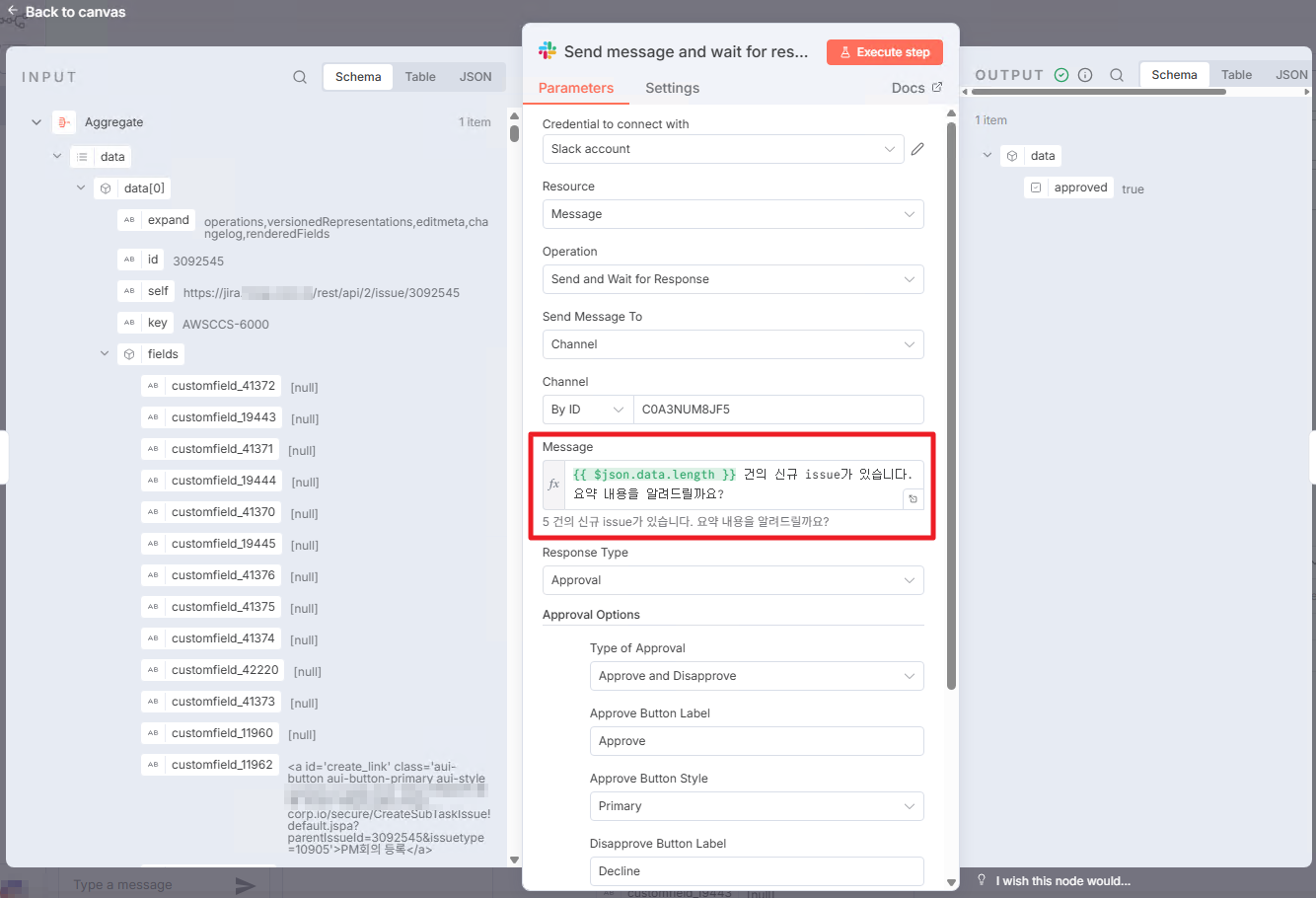
Slack 메시지 입력
Slack 전송 결과

Approve 버튼 클릭시 Webhook 응답

Anthropic Chat Model 설정 확인

Private LLM 응답 결과 확인

이슈 요약 내용 Slack 전송
프록시 서버 응답 상태 200 OK
마치며
n8n을 직접 AtoZ로 경험해보니, 초기 설정에도 시간이 많이 필요했고, 설정값 하나하나 민감했다.
실제로, claude 모델은 Temperature와 Top_p 중 한가지만을 보편적으로 사용한다지만 (둘다 랜덤성을 조절하기 때문)
n8n에서는 아예 하나의 옵션만 사용이 가능했고 (에러 로그를 아예 뱉어내면서 호출 불가능),
Top_p만 사용하려해도 => Temperature 옵션도 빈칸으로 꼭 추가해주어야 하는 불편함도 있었다. (default값으로 호출되어서)
이런 부분들은 개선되면 좋을 것 같다.

라고 생각한 찰나, 하단부에 제안 요청 버튼을 발견하게되어, 기능 개선을 요청해보았다.
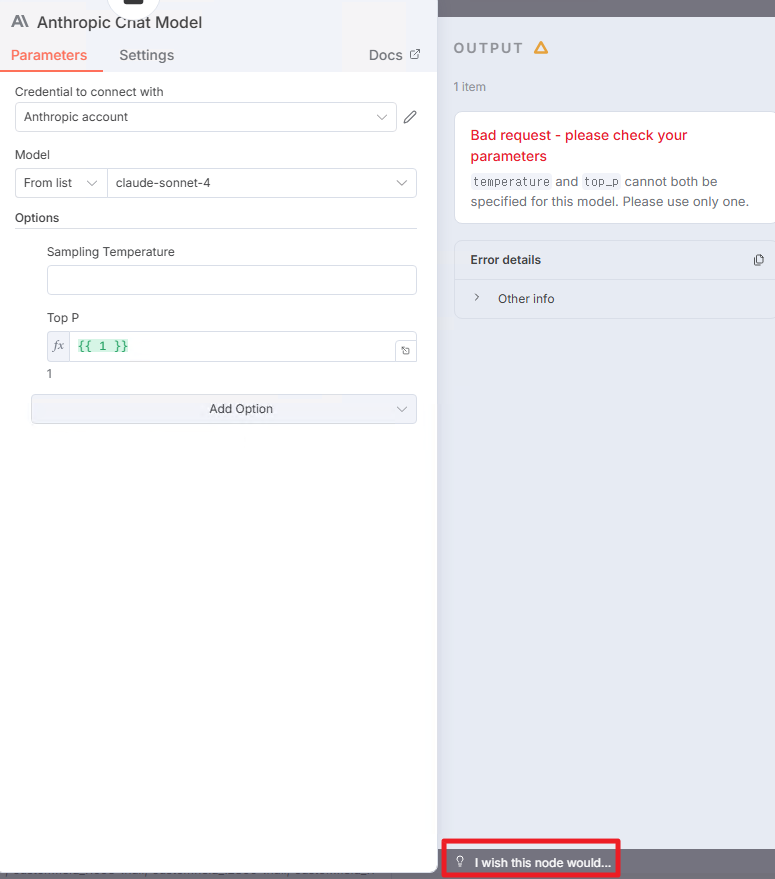
믿거나 말거나. 바뀌면 대박 !
I understand that for Claude models, it is generally recommended to use either Temperature or Top-p, as both parameters control randomness and are not typically used together.
In n8n, however, only one of these options can be used, and attempting to configure both results in an error that prevents the node from executing. Additionally, even when using only Top-p, the Temperature field must still be added (left blank), as it is called with a default value, which can be somewhat unintuitive.
To improve usability and reduce debugging time, I would like to suggest a small UX enhancement: if one of these parameters is selected, displaying a guidance or warning popup when the other parameter is also selected could help users quickly understand the constraint before execution.
I believe this would significantly shorten debugging time and provide a clearer, more user-friendly experience when configuring the node.
Thank you for considering this suggestion.

'IT > AI' 카테고리의 다른 글
| [Gemini] 제미나이에서 지브리 스타일 이미지 만들기 (막차 탑승) (0) | 2025.12.17 |
|---|---|
| [AI] n8n VS Make (나는 왜 n8n을 선택했는가?) (1) | 2025.12.16 |
| [AI] MCP란 무엇인가? (feat. n8n/Make) (0) | 2025.12.16 |